My node canvas for video: building a whole clip on a single graph
Everything you saw in the clip above was assembled by a system I wrote myself. Script, characters, scenes, cut, sound — node by node, on a single canvas. It's still an experiment, but the result already got to the point where I wanted to tell you about it.
The first three parts of the series took the pipeline apart piece by piece: how I picked the LLM for the scriptwriter, which video model to run, why a storyboard showed up between the script and the video. Here I show the whole canvas at once — and the first clip it assembled.
Why I even went and built this
At first I honestly tried the ready-made stuff. Took a couple of popular platforms, threw money at them, started putting a clip together — and burned through about $200 to barely squeeze out one clip. Not because the models are bad. The models are actually good. The problem is somewhere else: there's no connective tissue between them.
You generate images in one place. You describe the characters in another, and you keep it all in your own head — who looks like what, how they relate to each other. Lines are a third tool. The cut is a fourth. And none of it comes together in one spot: every step lives on its own, and you're hauling data between tabs by hand. For a single clip it's still bearable. For a system that's supposed to make them by the batch — dead end.
I'm an architect and I've worked with graphs my whole life: services, dependencies, data flows. And at some point it hit me that a video pipeline is exactly the same kind of graph. A frame depends on a character, a scene depends on a frame, the finale depends on all the scenes at once. The only thing missing was a tool where you could assemble that graph whole and push data through it, instead of rebuilding it in your head every single time.
So I stopped hunting for something ready-made and sat down to write my own.
The idea: the whole clip is a graph of nodes
I called the system AVG Node Canvas. Under the hood — litegraph (the same graph library ComfyUI is built on) plus my layer of nodes and a backend that calls the models. Each node does one step: writes the script, draws a frame, brings it to life as video, cuts it together. I connect them with wires — and data flows through the graph from a character's name all the way to a finished clip.
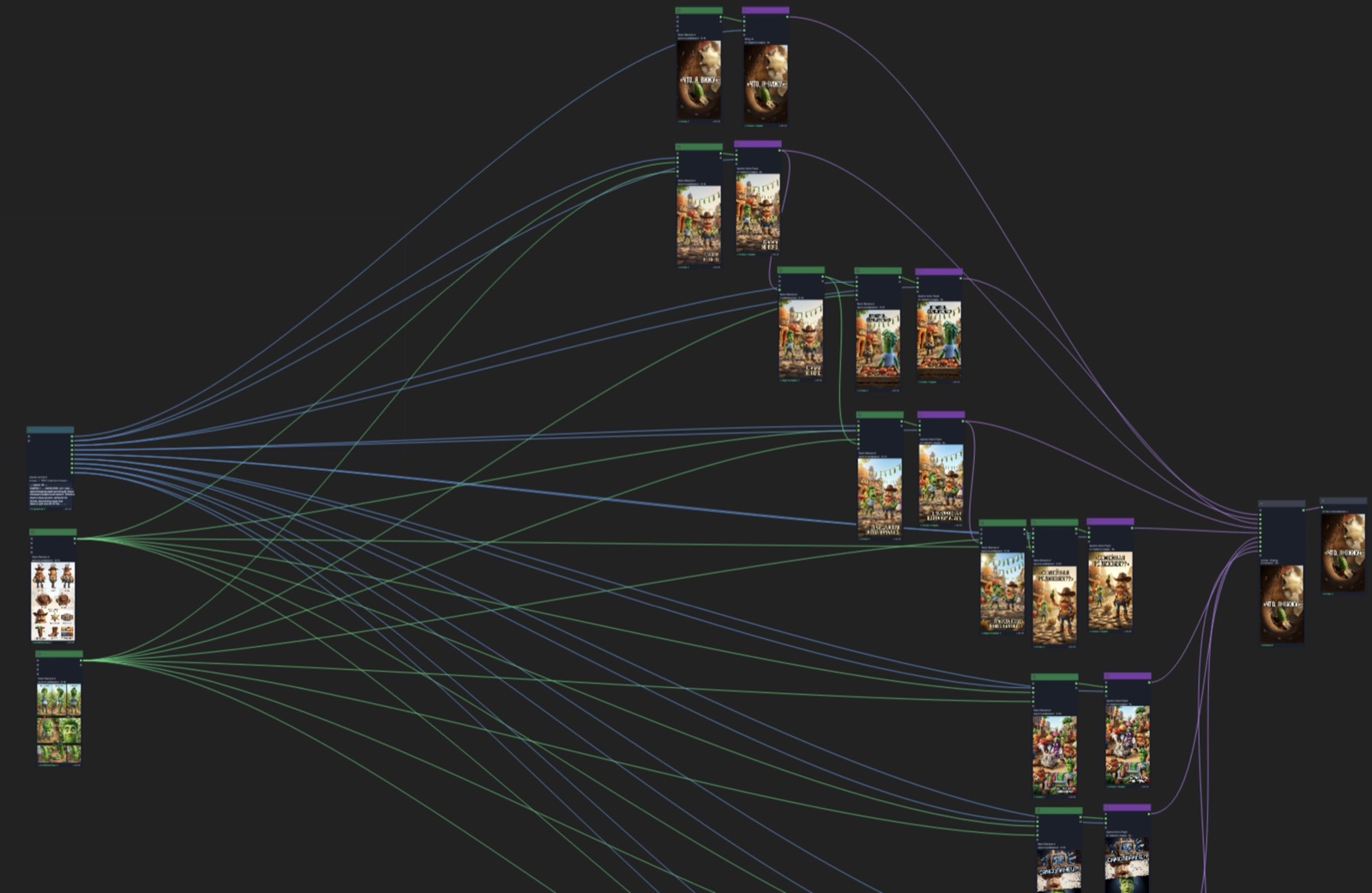
The main difference from ComfyUI or n8n — I'm not building a universal combine harvester. The canvas is tuned for one job: a short clip with dialogue and recurring characters. That's why the nodes here aren't abstract "load-process-save" but domain-specific: "Scriptwriter", "Soul", "Image", "Video", "Assembly".
There's one engineering detail I'll name anyway, because without it the canvas would be a toy: the ports are typed. I've got about a dozen types — text, frame, video, sound, voice, "soul", scene, script, element. A wire only connects between compatible ones: you can't plug a "scene" output into a "sound" input. Sounds boring, but that's exactly what keeps the graph from turning to mush once you've got thirty nodes.
Scriptwriter: I give a name — I get scenes
The first node is "Scriptwriter". I hand it a topic, or just a character's name, and it writes the script itself and breaks it into scenes: as many as it needs, that's how many it slices. Each scene gets its own image prompt, its motion for the video, its lines, its duration.
Under the hood here is Claude — I picked it with a blind test in the first part of the series. It also builds the dialogue: you give it character blocks — here's the little cucumber, here's the sheriff — and it hands back finished scenes with lines, where each one says its own thing. I don't need to lay out the shot list by hand; I set the frame, and the text and the logic are on the model.
Characters are "Souls"
I prep the characters ahead of time and store them as a separate entity — a "soul". A soul is a name, a portrait, a set of angles and character parameters. Build it once — and reuse it as a reference in any clip.
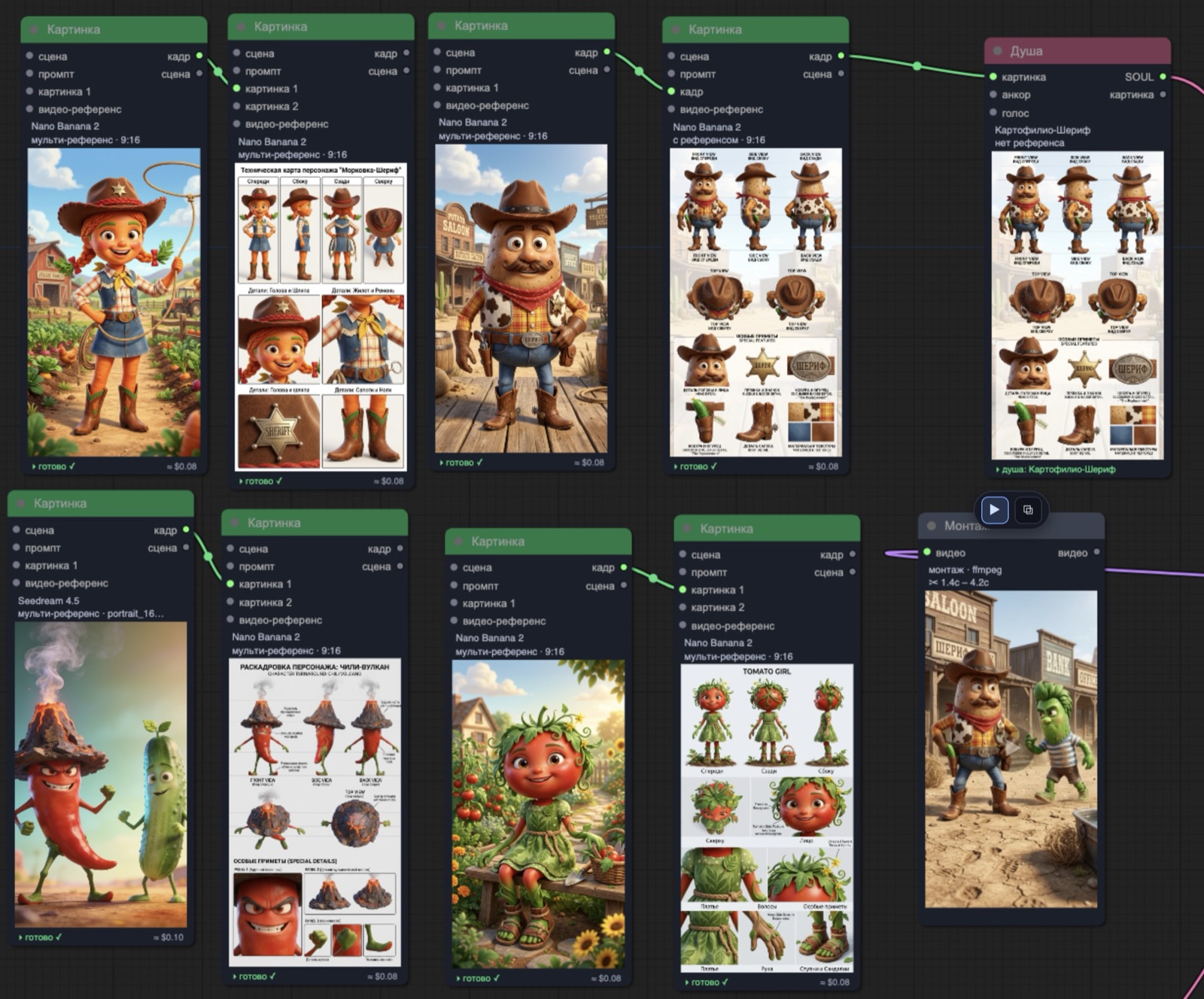
Sheriff Potato, the little cucumber, the carrot girl, the chili volcano — these are all leftovers from earlier experiments. I hook the soul I need up to the scriptwriter and the image nodes, and from there it carries all the way through the graph: the same character in every scene, not four different potatoes.
The bug that taught me a lot: the cabbage hat
And here's where I caught a really telling error. The scriptwriter writes a scene, but it can't see what the character looks like. It knows the name — "sheriff-potato" — and composes a prompt that doesn't contradict itself. By its own logic it all fits. And on the output the system draws the potato a hat. Made of cabbage.
Technically everything's correct: there's a hat, there's a character. It's just not the character I had in mind. And the bug nicely showed what was missing: the model writing the prompts knows nothing about how the characters look.
The fix turned out to be simple. I gave each character a separate description — up to about fifteen hundred tokens about looks and mannerisms — and started assembling a short "Characters in this clip: …" brief out of the connected characters, which goes into the scriptwriter's context ahead of the topic. Now the model, composing a scene, already has it in mind that the sheriff is a potato in a cowboy hat, not a cabbage one. Sheriff Potato became exactly what he's supposed to be.
And I like the takeaway more than the fix itself: almost always, when an AI spits out nonsense, it spits it out logically — just from the wrong data. What was missing wasn't the model's smarts, but context.
The main trick: one frame — and the scene is done
The thing I fought with longest was the start of a video. You generate a scene — and it kicks off not from the moment you want, but from somewhere in the middle. In one early experiment a cat was supposed to walk in the door and wake up its owners, and the model gave me a cat that's already standing there, already waking them. There's no setup.
I built a rig out of nodes and ran a pile of experiments with different parameters until I found a scheme that works. It goes like this. First I generate a starting image — and right on it I place the character references: who's in frame, in what pose, what's around. And I don't pass the character to the video node itself separately — only this first frame.
And that's where the main thing kicks in: the image itself carries both the character and the staging. The video model takes it as the first frame and just keeps going — it doesn't invent the setup from scratch, it draws the motion out from what's already there. One frame — and the scene is done.
In the demo the video nodes run Gemini Omni Flash, which makes an eight-second clip "from the first frame". But the model here is swappable: the canvas handles Kling too, and Seedance, and Grok Imagine — whichever fits the scene best is the one I plug in.
One universe: scenes latch onto each other
Next it's important that the scenes don't live apart but add up into one world. I do this by hand — and that's actually the part I like, because the canvas gives me control.
Before the third scene I take the last frame of the second and pass it as a reference — effectively as the first frame of the next clip. I add the little cucumber to it, shift the angle a bit, and the model stitches it neatly: one scene rolls smoothly into the next.
And sometimes I deliberately don't keep the base context. And you get an unexpected transition that looks like it was planned that way all along. The clip's style is intentionally absurd, so cuts like that are a plus.
Final assembly
At the end I put it all together into a story. Into the final scene I pass the characters — the sheriff and the little cucumber — and the first frame I need, to keep the continuity. I want the trimmings around them: the little shop, the carrot, the crowd — I toss in references for all the characters at once.
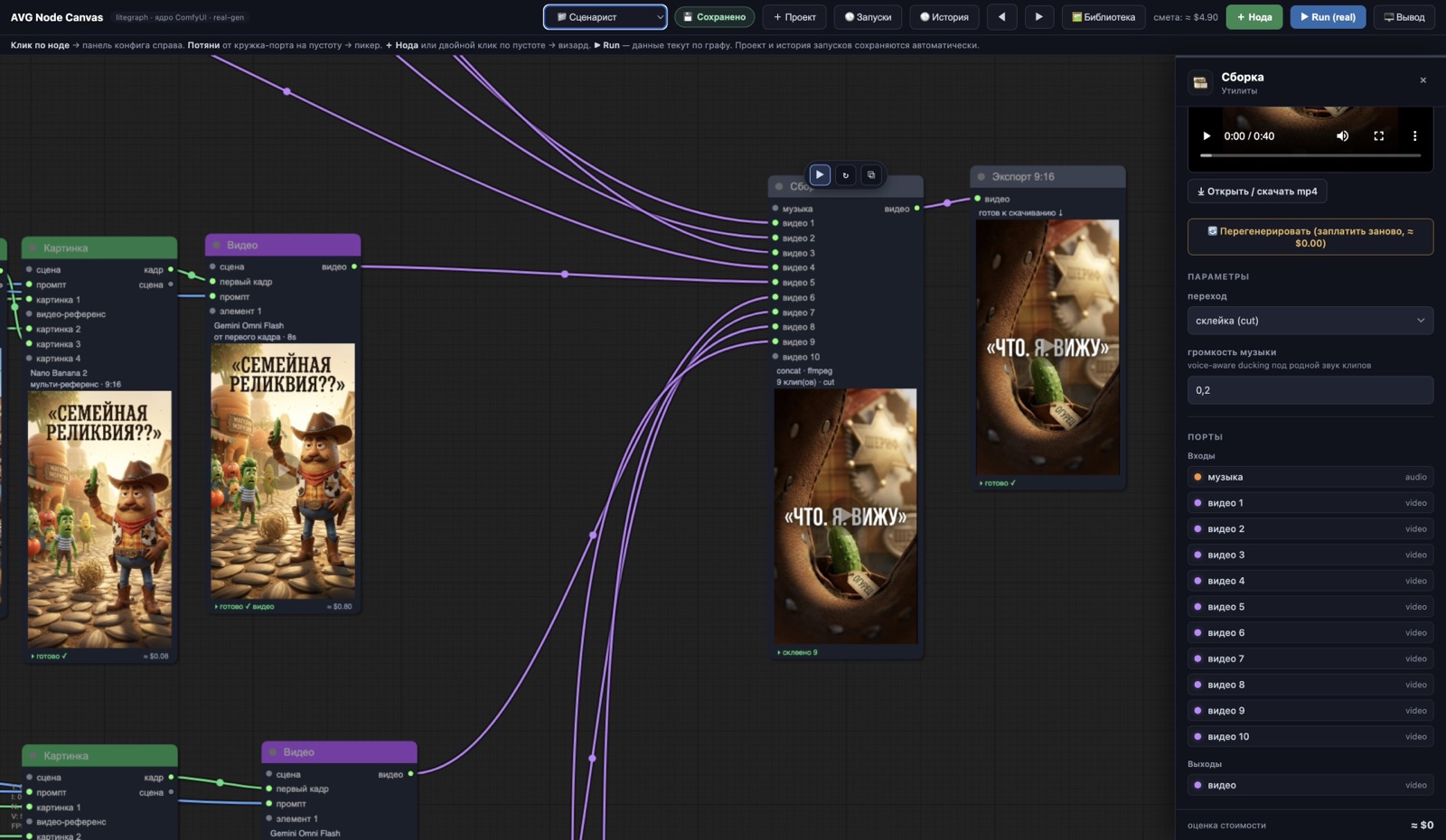
The cutting is handled by the "Assembly" node: it runs ffmpeg, butts the clips together end to end or through a short crossfade, and ducks the music under speech — the volume drops to 20% when someone's talking. After that "Export 9:16" — and the clip is ready to download.
One more little thing that made building my own canvas worth it: the cost estimate is computed right on the graph. Every node shows an approximate price — an image is around eight cents, a video node costs more, the whole graph in this project came to about five dollars. And there's caching right there: if a node's inputs haven't changed, a rerun costs zero. You don't overpay for what's already been computed.
What's next
Let me repeat what I opened with: this is still an experiment. There's room to grow — both in the quality of the cuts and in automating the manual steps. But even now a coherent clip, from a character's name to a finished file, gets built on a single canvas, not across five tabs for $200.
And I've got a real question for you. I'm curious whether something like this would land as a product — so you could put clips together on the same kind of canvas yourself. If enough interest shows up, I'll open access. Tell me if it's worth it.