My Architect, part 3: a planning model that makes agents think like architects
This is the third post in the series about My Architect. In part 1 I explained why an agent needs memory between sessions, in part 2 — how it all lives in YAML files with no database. Now, the model itself: what exactly the agent reads and writes when it plans.
By default, an agent generates todos
Ask an agent to plan a project and it will produce a flat list of forty items like "Implement login", "Add tests", "Fix CORS". A week later that list is useless: it's unclear what depends on what, where the release boundary is, and why item 23 even exists. The agent isn't dumb — it just has no shape to think in. The planning model in My Architect is that shape.
Hierarchy: presets and depth
A project is a tree of nodes. Depth and level names come from a preset: agile gives Epic → Feature → Story → Task, SAFe starts with Initiative (Initiative → Epic → Feature → Story), simple is limited to two levels Category → Item, and custom lets you name the levels however you like. The maximum depth equals the number of levels in the preset, and the server enforces it: move_node rejects a move that would push a subtree past the limit (error MAX_DEPTH_EXCEEDED).
When creating a project via scaffold_project, complexity is chosen separately: simple, standard or complex. It determines the starting set: for standard and complex both a WBS diagram and a User Story Map are created right away.
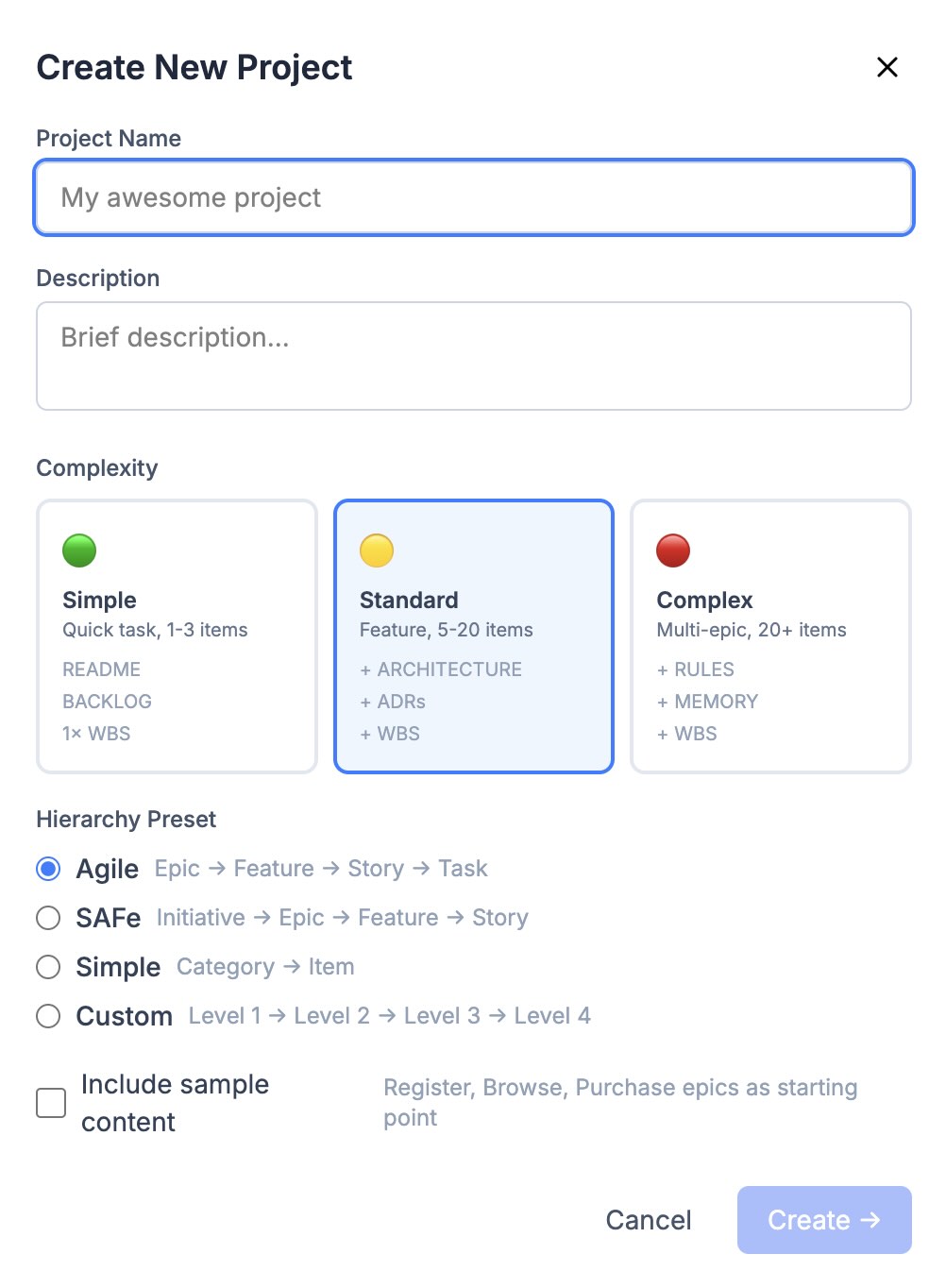
Creating a project: complexity sets the starting kit, the preset sets the level philosophy: Epic → Feature → Story → Task.
Anatomy of a node
Every node has a semantic type and a numeric level, and these are deliberately different things (why — a bit further down). The status is one of five: draft, todo, in-progress, done, blocked. Priority P1–P3, a release assignment, the worker in assignee (agent or human). A node doesn't store content inside itself; it holds it by reference: requirementIds for requirements, docIds for documents, diagramIds for diagrams, plus requires — the list of requirements the node must satisfy.
Four requirement types with typed fields
Decisions in a project are recorded as requirements of four types, and each type has its own structured fields rather than freeform text.
- FR (functional):
userStory,acceptanceCriteria,businessValue. - NFR (non-functional):
metric,targetValue,measurementMethod. - SAR (architectural decision):
rationale,alternatives,consequences. - CON (constraint):
sourceandflexibilitywith values fixed or negotiable.
Identifiers are generated automatically from a per-type counter: FR-001, NFR-002. The agent calls add_requirement, and something like this appears on disk:
id: NFR-003
type: NFR
title: API response time
ownerNodeId: epic-payments
status: approved
fields:
  metric: response time p95
  targetValue: "< 200 ms"
  measurementMethod: load test, 1000 concurrent users
The difference from a note saying "the API should be fast" is that an NFR comes with a way to verify it. And the flexibility field on constraints answers the question agents usually settle silently and wrongly: can this be argued with. A CON from the lawyers is fixed; a CON like "hosting budget is 50 dollars" is negotiable.
Inheritance instead of copying
A requirement belongs to exactly one node via ownerNodeId. But it is visible to the entire subtree: get_requirements with the inherited flag climbs the chain of ancestors and collects everything hanging above. An NFR "p95 under 200 ms" attached to an epic will reach the agent from any nested task, even though the requirement is physically written down once.
This solves the classic problem of copies. If the NFR were duplicated into every task, then changing the target from 200 to 150 ms would mean finding and fixing every copy, and one of them would inevitably stay stale. Here the source is single and visibility is computed at read time. For the reverse link there's tracesTo: a requirement can explicitly point at the nodes that implement it, and traceability is built from this field.
The title linter: nodes name entities
The most contested feature by feedback and the most useful one in practice. RFC-013 states the rule like this: a node's title names the entity that will exist as a result, not the work. "Login system", not "Implement login". The linter fires right inside build_hierarchy and update_node: a tree with bad titles won't be created, and you can't dodge the rule by renaming either.
What exactly gets rejected: leading imperatives (Add, Create, Build, Implement, Fix and the like), step pipelines like "GET → parse → render", enumerations joined with " + ", option lists a/b/c, comma-separated enumerations, acceptance criteria in trailing parentheses ("(TDD, no regressions)") and titles longer than ten words. Every rejection comes back to the agent with an explanation of where to put the excess: steps and acceptance go into the description or requirements, enumerated scope goes into child nodes.
Agents without the linter consistently serialize their current working state into the title. The linter is tuned on a real corpus of production titles and catches exactly these forms. The result shows after a month: a backlog of 200 nodes reads like a map of what the product can do, not a log of who once did what.
The User Story Map as text
The human has the USM canvas, but the agent doesn't need a picture. get_usm_view returns the same map as a structure: backbone columns horizontally, release bands vertically. The cells contain cards with statuses and assignees. The backbone level is determined automatically: it's the one whose nodes have the most children with an assigned release. Cards without a release fall into the unplanned bucket, and its size is an honest metric of how much work is still unscheduled. Completion statistics (total/done/in-progress) are computed per release on the spot.
Assigning nodes to a release is done atomically via plan_release: all updates go out in one bulk request, and the response contains separate successful and failed lists, so a partial failure is visible immediately.
The details when restructuring the tree
move_node moves a node together with its subtree and recalculates levels. The interesting part is in the details: the type is recalculated only for nodes whose type matched their level before the move. A story that moves under an epic becomes a feature. But a node whose type was deliberately set against its level keeps its type, and the discrepancy is later flagged by validate_project rather than by silent automation. Cycles (moving under your own descendant) are rejected with CYCLE_DETECTED before anything is written.
For the case "the node is in the right place but labeled with the wrong type" there's a separate set_node_type: only the semantic type changes, while id, slug, position, children and all references stay put.
And one last detail: WBS numbering (1.2.3) is stored nowhere. It is computed on the fly from position among siblings, so after any move the numbering stays dense and gap-free.
What's next
The model answers the question "how is the plan structured". The next part is about how the agent works against that plan: the loop from get_next_task to complete_task, documentation as part of the task, and reconciling the plan against the real code. You can try My Architect at my-architect.app.